
Choose and configure services.
Search the AWS catalog, add supported services, and edit properties such as Lambda runtime, memory, and timeout.
Open-source AWS architecture workspace
Cloud Markup brings AWS services, configuration, connections, and validation into one visual workspace. Make design decisions with the model in view.
Already have an account? Sign in. Registration follows current beta availability.
Inside the actual application
The Atlas Commerce reference example brings ingress, processing, messaging and data decisions into one visual model. Explore it as a synthetic design in progress.
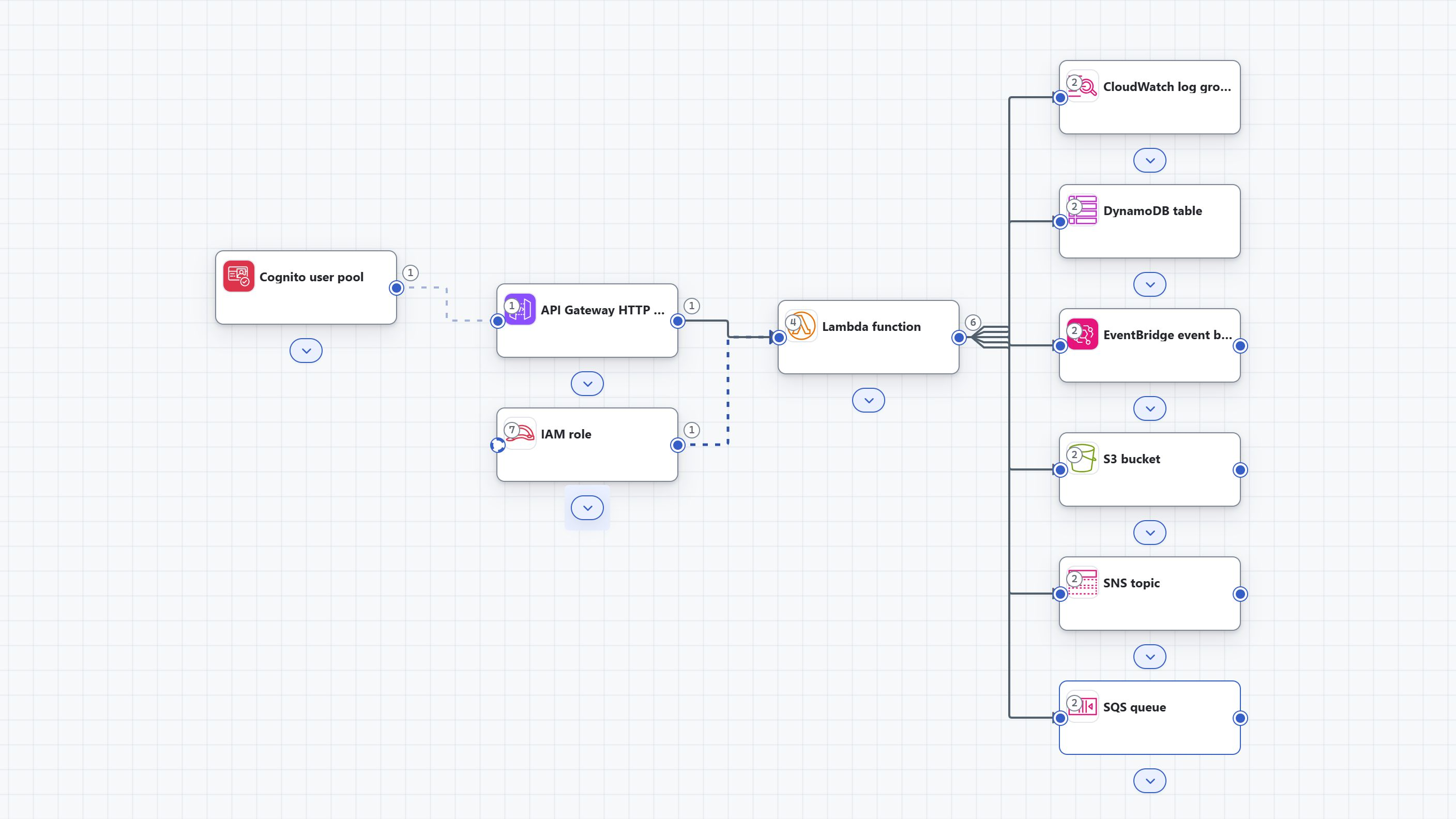
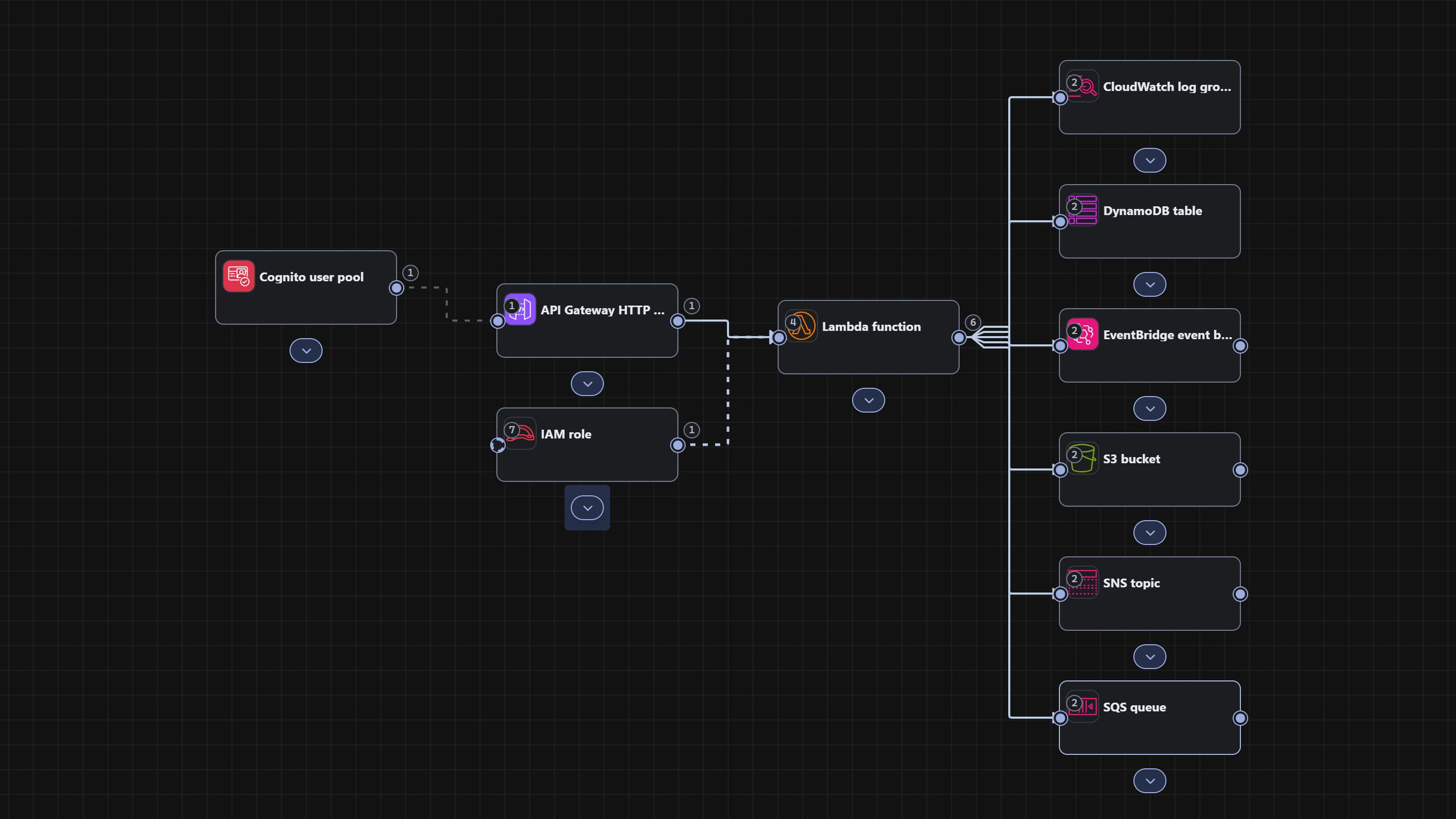
A synthetic architecture model. These screenshots show design activity; they do not show deployed resources or live order processing.
What you can do
Configure resources and understand what each connection means before carrying the design forward.
Search the AWS catalog, add supported services, and edit properties such as Lambda runtime, memory, and timeout.
Inspect connection requirements, permissions, and delivery guidance before applying a typed relationship.
Run supported checks and inspect the exact finding against the affected resources. An unresolved question stays part of the review.
Interactive illustration
An illustrated guide to the EventBridge Order Pipeline example. Select a service to inspect its configuration and relationships.
Marketing illustration based on the demo model. This explores static explanations; it does not run the application or deploy cloud resources.
An IAM execution role is assigned to a Lambda function. The function publishes to an EventBridge event bus and sends messages to an SQS queue.
Select a service with a click or Enter. Arrow keys move between services. Escape returns to the overview.
One model, three relationships. Explore the permissions, settings, and delivery questions behind the diagram.
Permissions in the model
The execution role is assigned to the Lambda function. Review the access required by its connected services alongside the architecture.
events:PutEvents permission on the connected bus.Configuration from the example
Publish synthetic order events to EventBridge and enqueue fulfillment work in SQS. The application provides an explicit manual purpose preview before applying changes.
A stated design purpose is not evidence of generated code or a deployed workload.
Typed relationship
The Lambda publisher connects to the EventBridge event bus. Connection review shows the intended event-publication permission before the relationship is applied.
events:PutEvents on the connected bus.Work waiting to be handled
The model connects the Lambda function to an SQS queue for synthetic fulfillment work. The queue is a separate resource with its own configuration.
Inspect the connection requirements and intended permissions in the app, then review findings against the model. This illustration shows design intent; no messages are sent.
Regional availability remains an open question in the captured validation run.
Design to handoff
Design, configure, connect, validate, review, then export where your workspace supports it. CloudFormation is the current export target; access and workload coverage vary in beta.
Add supported AWS resources.
Set properties and purpose.
Review typed relationships.
Run checks and read findings.
Resolve or document open questions.
Where available, review a saved revision's output.
Open source · Apache 2.0
CloudMarkup's application source is public under the Apache License 2.0. Browse CloudMarkup-App for source, local setup guides and contribution guidance.
View CloudMarkup-App on GitHubThe public source and hosted beta have separate release cycles. Local setup does not enable hosted services or paid integrations.
See the roadmap, including AzureChoose your starting point
Try the hosted beta, or follow the public local setup guides. Availability differs by environment.